
From the first connection to the sealed decision.
REVIEWIT is one platform with three customer consoles, a certification cycle that ends in evidence, and a set of trust services underneath. Every capability ships in both editions.
You cannot certify what you have not seen.
Before any campaign, REVIEWIT binds your solutions, collects what they hold and draws the boundaries. Collection is scoped, probed and repeatable, so a campaign always starts from a fresh, frozen picture of the estate.
A connection is an identity
Each solution is bound through its own credentials, held in the vault, with a health probe you can run at any time and a scope per channel.
A catalogue that grows with you
Every solution is described as workloads and resource types with their attributes and their policies. Your systems join the catalogue through the same model; it never stops at a list.
Scoped, planned, snapshotted
Collection runs on a plan, produces a snapshot, and feeds the campaign perimeter. Manual import is an executor like any other.
Identities from your providers
Users, managers and groups are collected from your identity providers, so reviewer resolution never invents an address.
One loop, six acts, no operational noise.
Discover
Bind a solution through its identity, probe its health, collect what it holds.
Scope & policy
Pick a resource type, a policy and a targeting mode. Freeze the perimeter.
Campaign
Reviewers are assigned, notified and reminded. Delegated workspaces run their own.
Decide
Certify, revoke, grant a temporary exception, escalate or consult, with comments and evidence.
Sign off & seal
A named human signs the batch. The closure is sealed into the audit trail.
Remediate & learn
Exceptions expire, deletions are tracked, INSIGHTS checks whether revocations took effect.
The reviewer portal: dense, focused, decisive.
Reviewers see what is due, decide in bulk or one by one, and never lose the context: policy, solution, campaign, co-reviewers, last decision, evidence. Every screen is a dense grid with a side panel, never a wall of cards.
- Work queue. Filters in the URL, sticky headers, server-side pagination, bulk actions, column management, search across your reviews.
- Decisions with nuance. Certify, certify with reservations, revoke, mark not compliant, or grant a temporary exception with a duration. Escalate to another reviewer or consult a colleague along the way.
- Delegation in traced cycles. Delegate for a bounded period, never permanently. Revocation, never deletion.
- Sign-off. Batches are signed by a named human. The system never signs and no delegated signer can be configured.
- Your identity is your scope. The queue spans workspaces because a reviewer is a person, not a seat in a team.
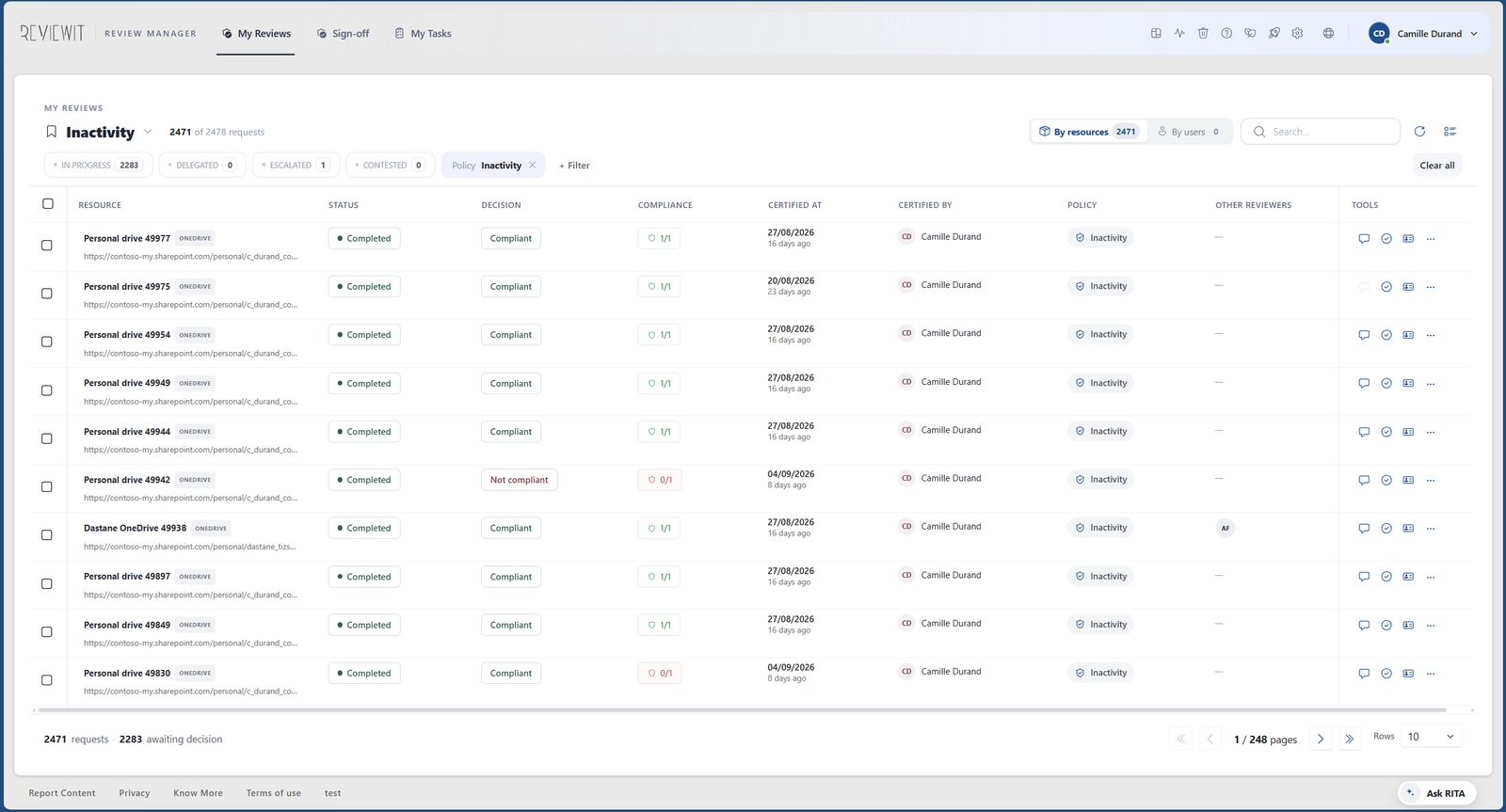
Where campaigns are designed, run and understood.
A workspace is a unit of delegated governance: a business unit, a country, an entity. Its managers run their own campaigns within the boundaries the subscription set.
- Campaign wizard. Resource type, policy, targeting mode, perimeter conditions, reviewer population, reminders, mail templates, group scope. Simulation mode to rehearse without notifying anyone.
- Policy extensions. Each policy carries its own settings, serialised with the campaign, so two campaigns on the same policy can differ and remain comparable.
- Pipeline you can watch. Collection, freezing, assignment, notification, closure, with a watchdog and re-arming when a stage stalls.
- Restitution and analysis. Reports that prove the review happened, an alert centre with 23 families, the audit trail by scope, and INSIGHTS at the first level of the menu.
- Guided onboarding. Discovery guides on every screen, seeded by the product and repaired at startup. One step per navigation button.
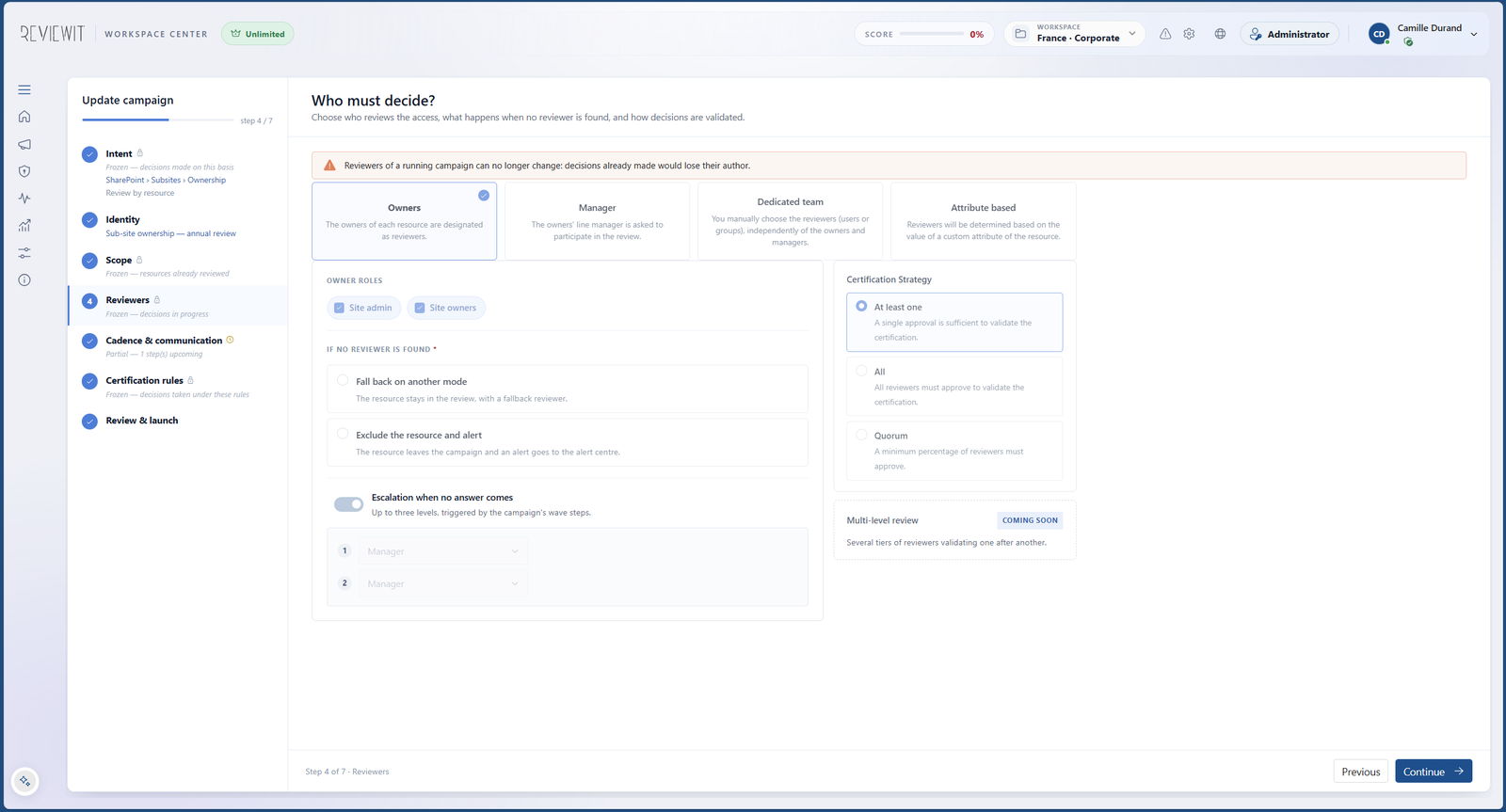
Delegate governance. Keep the boundaries.
The subscription administrator creates workspaces, grants them features and credits, and keeps what must stay central: identity, retention, branding, security posture and the acceptance of your terms.
- Workspaces with boundaries. Each workspace gets its solutions, its features and its credit envelope. Consumption is tracked in one register.
- Entitlements and credits. Tiered editions, credit lots with expiry, first-in first-out consumption, card or invoice purchase.
- Retention module. Every data category declared with its retention and its purge, matching the DPA clause you sign. Legal holds suspend purge for a scope.
- Branding. Your logo, your colour and your font across the consoles, with a contrast guard so buttons stay readable.
What happens to a decision after it is made.
Most platforms stop at the decision. REVIEWIT's value starts there.
Decision
A named reviewer decides, with a comment and evidence. Co-reviewers can disagree, and the divergence is kept, never averaged.
Challenge
An optional challenge period lets the person concerned contest a decision. The contest and its outcome are both preserved.
Sign-off
A named human signs the batch. The platform never signs and cannot be configured to sign on anyone's behalf.
Seal
The closed occurrence is sealed and chained into the audit trail segment of its scope. Auditors read it. Nobody edits it.
Everything ships in every edition.
| Area | What you get | Where |
|---|---|---|
| Discover | Connections with vault-held credentials and health probes, solution catalogue, planned collection with snapshots, manual import, identity directory | Subscription & Workspace Manager |
| Campaigns | Wizard, simulation mode, policy extensions, perimeter conditions, reminders, mail templates, group scope, watchdog and re-arming | Workspace Manager |
| Decisions | Certify, keep, reservations, revoke, not compliant, exception with duration, escalate, consult, challenge, bulk actions, comments, evidence, delegation in traced cycles, sanctuary in traced cycles | Review Manager |
| Evidence | Sign-off by named humans, sealed occurrences, audit trail segmented per scope, certification dossier, auditor access read-only | All consoles |
| Restitution | Reports, alert centre with 23 families and 4 detectors, notifications through an outbox, BEACON to your SIEM | Workspace & Subscription Manager |
| Remediate | Exceptions with a duration, deletion requests tracked to execution, revocation-without-effect finding; write-back of remediation actions is the next step | Review & Workspace Manager |
| INSIGHTS | Series, differential, revocation without effect, findings, governed definitions with versioned identifiers | Workspace Manager · Unlimited |
| RITA | Contextual assistant on every console, response contracts without any decision action, every turn ledgered | All consoles |
| Governance | Workspaces with boundaries, entitlements, credits, retention module, legal holds, branding, deletion requests | Subscription Manager |
| Auditor surface | Read-only Auditor role with banner and expiry, audit posture cockpit, audit trail reader, audit dossier with digest and embedded sign-off packages, evidence verifier open to every role | Workspace Manager |
| Identity | TrustGate broker, Entra ID, Google, generic OIDC, MFA step-up on admin surfaces, identity directory collected from your providers | Platform |
| Integration | Public API for campaigns, reviews, evidence, audit, deletions and resources (never for decisions); BEACON to your SIEM; connection model with health probes; solution catalogue | Platform |
See it on your own scope.
Pick a resource type and a policy. We will run the walkthrough on that, down to the sealed evidence.